

How to Register
Step 1: You will click on Register found on the left-hand side of the RunSignUp Page as seen below.
Step 2: If you have a RunSignUp account you can log in, if you do not have one, go ahead and create one. However, you will need to sign up your Child as seen below, do not register yourself!: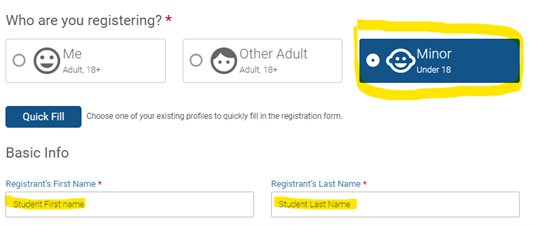
Step 3: You will then select your student’s grade level and then find their teacher in the drop-down menu.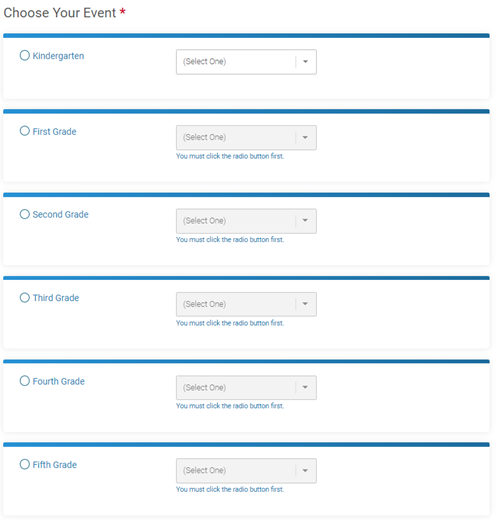
Step 4: If you have more students/children, you can select +Add Another Registrant, fill out the information for the next student/child, pick their grade level and teacher and continue to do that until you have selected all your students/children. Once you are finished adding all your students/children you may select continue: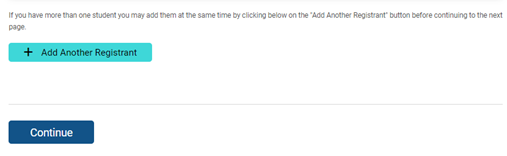
Step 5: The waiver stating all the rules and fine print for participation in both the fundraiser and the Sports-A-Thon Day on February 24th are included here, please read it, check the box or boxes and press continue.
Step 6: You will select and join your child/children’s classroom, double check which child you are selecting a class for if you are registering more than one. Select their class, then hit continue.
Step 7: This is where you will set up your fundraiser. Make sure you spell out your child’s first and last name. Create a goal so you can keep track of how much you have fundraised! You can leave the “Tagline” blank this just adds something fun like “Help me reach my goal.” You can input whatever you want it to say, and it is optional so you may leave it blank. You also have the option to create your own URL, otherwise RunSignUp will create a URL for you. You can also upload your own image to share with your message.
A Personal Message has already been created for you that you can edit and modify to your liking in English, Spanish and Portuguese. Again, you can edit/modify this however it best suits you. This will be sent to whoever you share your link to as well as visible to anyone that searches for you through the main Fundraiser page. Underneath the customizable personal message are donation options where you can start your page off with your own personal donation or you can leave it at $0.00 just to get registered and start sharing your link! When you are all done hit continue and it will take you to the final page.
Step 8: On the final page you will complete your registration. Verify your information. You also could add another child if you forgot to add a second student/child during the initial setup. If you decided to not donate any money right now you should have a $0.00 total and can click Complete Registration. Once you are done you will get a pop up that will let you share your links. You can also get your link if you click where it says Refer your Friends on the top. If you click where I highlighted under Fundraisers and click on your student/child’s name (highlighted), that link will take you to your personal page where you can see how much you have raised and any achievements/prizes you have unlocked!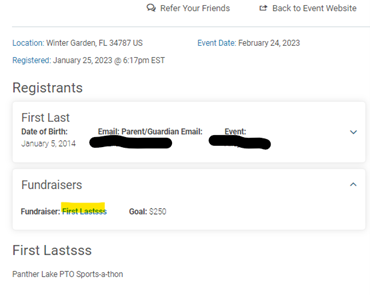
Click the icon below to download the attached PDF.

