

Course Info
The Ville to Ville Coastal Relay celebrates the South Carolina Lowcountry, spanning roughly 68 miles from Summerville to Mount Pleasant. Teams will wind through historic Charleston, barrier islands, and marshland before finishing with a scenic view of the Cooper River. The course will take place on open roads and will primarily utilize existing sidewalks and greenways. Because portions of the route run through urban areas, runners should expect stops at traffic signals, stop signs, and railroad crossings, as well as possible bridge delays. There will be no road closures.
Required Safety Equipment for Each Team
Two Reflective Vests | Two Headlamps | Two Blinking LED Lights
Individual Legs:
- Leg 1 - Nexton Elementary to Gahagan Park - 6.06 Miles
- Leg 2 - Gahagan Park to Summerville Prep - 5.36 Miles
- Leg 3 - Summerville Prep to Roper St. Francis - 7.80 Miles
- Leg 4 - Roper St. Francis to Green Charter Lowcountry - 4.0 Miles
- Leg 5 - Green Charter Lowcountry to Hanahan Rec - 3.25 Miles
- Leg 6 - Hanahan Rec to Coast Brewing - 6.68 Miles
- Leg 7 - Coast Brewing to Edmund's Oast Brewing - 4.53 Miles
- Leg 8 - Edmund's Oast Brewing to Liberty Square Parking Lot - 6.98 Miles
- Leg 9 - Liberty Square Parking Lot to Mamie P. Whitesides Elementary - 8.57 Miles
- Leg 10 - Mamie P. Whitesides Elementary to Sunrise Church - 6.55 Miles
- Leg 11 - Sunrise Church to Duffy Baseball Complex - 4.35 Miles
- Leg 12 - Duffy Baseball Complex to The Lawn at Ferry Wharf - 3.5 Miles
How to Split the Legs
- Teams are not required to run in any specific order; however, we recommend running in order. Runner #1 would run legs 1 & 7, Runner #2 would run legs 2 & 8, and so on.
- Another option to more evenly split the miles among six runners while still allowing ample breaks between each run.
- Runner 1 = Legs 1 & 7 = 10.6 total miles
- Runner 2 = Legs 2 & 8 - 12.3 total miles
- Runner 3 = Legs 3 & 12 = 11.3 total miles
- Runner 4 = Legs 4 & 10 = 10.5 total miles
- Runner 5 = Legs 5 & 9 = 11.8 total miles
- Runner 6 = Legs 6 & 11 = 11.1 total miles
- Teams with fewer than six runners can have runners complete consecutive legs.
Course Resources
- Strava Maps - Can be downloaded to your watch or device and used for directions if you have a subscription.
- Course Leg Ratings and Rankings
- Runner Directions - Printable
- Pace Calculator: Click "Make a copy" to calculate your team's pace. Team pace estimates are due September 8. Captains can click here to update their team pace.
- Timing Adjustment Form - Use to report any on-course delays during the relay.
- Driving Directions - With Google Maps
- Driving Directions - Printable
Directional Tips
If you have a smartphone with GPS capabilities, you can use the plotaroute app to help follow a route from plotaroute.com.
1. Select the route you want to follow and view the interactive route map.
2. Tap on the Tracker icon in the bottom right to enter SatNav mode.
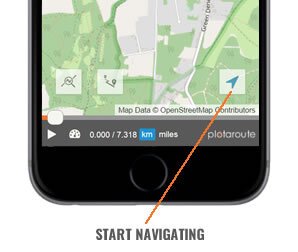
3. Follow the route using the tracker marker as a guide. The app will automatically detect your position on the route from your current location and heading. The next turn will be shown at the top of the screen, along with the distance to the turn. Tapping the Distance To Turn will toggle it to show time instead of distance.
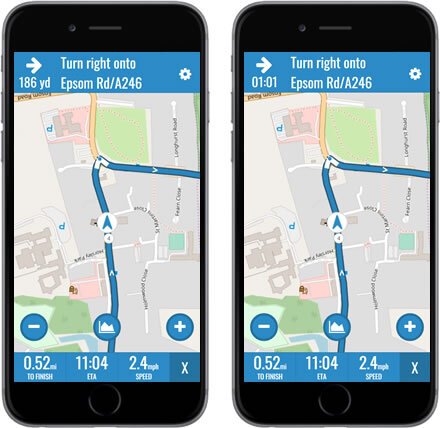
4. To display the route's hill profile tap on the Hills button. Your hill position will be indicated by a blue dot.
5. You can zoom in and out by tapping on the + and - buttons on the map.
6. There are 3 data fields at the bottom of the screen:
- DISTANCE TO END OF ROUTE - Tap this to change between miles and km.
- ETA / TIME TO FINISH - Tap this to toggle between ETA and Time Remaining.
- SPEED / ELEVATION - Tap this to change between current speed and current height above sea level.\
7. To access the SatNav settings, tap the gear icon in the top right.
8. The following Navigation settings are available.
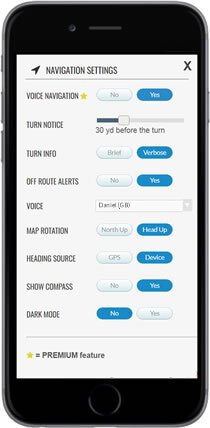
VOICE NAVIGATION (Premium feature)
- VOICE NAVIGATION - Enable/disable voice navigation.
- TURN NOTICE - How far before each turn you want a voice alert.
- TURN INFO:
- BRIEF - Turn direction only, e.g. Turn left
- VERBOSE - Reads the directions (max. 25 words), e.g. Turn left onto Sunshine Avenue
- OFF-ROUTE ALERTS - Alerts you when you are off-route, including heading in the wrong direction.
- VOICE - The voice that will be used to speak the navigation instructions (see note below).
- OTHER SETTINGS
- MAP ROTATION - North Up (no rotation) or Head Up (rotate map for current heading).
- HEADING SOURCE - GPS (heading changes when you move) or DEVICE (heading changes when you rotate your device).
- SHOW COMPASS - Display a compass on the map.
- DARK MODE - Uses a dark maps during navigation to conserve battery life.
9. To exit SatNav mode tap the X in the bottom right corner.
V2V Chatbot
AIYou are about to initiate a chat with an AI assistant (not a person).
By clicking “Agree and start chatting”, you agree to the collection, recording, storage and processing of this chat communication as outlined in our Privacy Policy.